Dinkar Kamat

Updated 3 months ago

Microsoft’s proprietary art and canvas program

MS Paint is a free multimedia and graphics editor that has been a standard part of the Windows operating system since 1985. Originally known for its 8-bit aesthetic in earlier versions, it serves as the foundational program for many users. It provides a straightforward platform for quick edits and basic image creation.

Top Recommended Alternative
MS Paint acts as the first exposure to digital art and image manipulation for new computer users. It supports modern file formats like PNG and JPEG; its simple toolbox is designed to be instantly understandable, allowing anyone to quickly doodle, crop, or resize an image without needing a complex user manual.

The most recognizable paint program

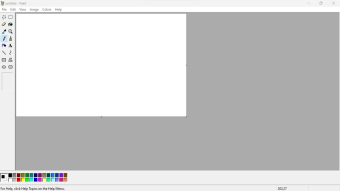
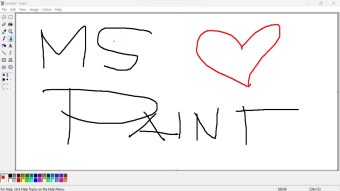
MS Paint’s unrivaled simplicity and focus on fundamental tools offer basic drawing implements, including a pencil, paintbrush, eraser, and simple shapes, all accessed via an intuitive, uncluttered interface. This easy learning curve makes it perfect for quick cropping, resizing, or adding basic text and arrows to screenshots. It supports essential file types like BMP, JPEG, and PNG, making it highly compatible for everyday tasks.

Beyond its utility, it has developed a significant cultural impact due to its limitations. The program’s basic nature fostered a unique art style, often utilized for creating humorous, low-fidelity internet memes and simple animations. Many artists specifically embrace the primitive aesthetic, creating surprisingly elaborate digital paintings with only the mouse and the restricted color palette, showcasing the creativity that can emerge from necessity.

Despite its nostalgic appeal, it suffers from a lack of professional features. Most notably, it does not support image layers or transparency management, which is a fundamental requirement for any serious graphic design work. The tool selection is extremely limited, forcing users to rely on cumbersome workarounds for basic editing tasks. Furthermore, the application struggles with large files and lacks proper color management, resulting in degraded image quality upon saving.

A household name for decades to come

In summary, MS Paint should be celebrated not as a professional design tool, but as a lightweight, essential utility and cultural icon. It remains the ideal program for users who need to perform instant, no-fuss image adjustments like cropping or quick doodling. While its simplicity becomes a limitation for advanced work, its accessibility guarantees its continued relevance as the default and dependable first stop for basic image editing.


Dinkar Kamat

Dinkar has more than 10 years of experience in content creation, including technical articles, travel writing, and product strategy. His expertise spans SEO, digital marketing, and structured editorial work. He focuses on producing content that is both accurate and accessible for diverse audiences.

  • Pros

    • Unrivaled simplicity
    • Universal accessibility
    • Perfect for quick edits and cropping
  • Cons

    • No support for image layers
    • Lack of transparency control
    • Very limited tool selection
    • Poor color management for advanced work
 0/3

App specs

Also available in other platforms

Program available in other languages


Icon of program: MS Paint

MS Paint for PC

  • Free
  • 4.2
    3041
  • 1.5M
  • V11.2309.24.0

User reviews about MS Paint

4.2

13 reviews

Add review

Main reviews for you

  • Anonymous user

    This is what I used to be able to do, but with this new program I can't copy and paste. I am using print screen and then paste but it never puts anything in the paste screen.

  • Anonymous user

    I absolutely hate both paint and paint 3d in windows 11. Can I get windows 10 paint back?

  • Anonymous user

    My suggestion to Ms paint if we text something in the paint we need to edit again while using after saving file no need beacuse while using the paint explaining something if we written but we cannot edit again we need to rub so if edit option there It will be best app

  • Anonymous user

    Not useful it shows only a few options all options are not shown as in window inbuiit paint

  • Anonymous user

    This app is my favourite app i even seen!that helped meh to do ponies,humans and normaly animals! 10 stars!

  • Anonymous user

    An icon, wonderful and perfect. absolute relic of the past and an important part of out society. Beautiful and perfect. lovley.

More

You may also like

Alternatives to MS Paint

Explore Apps

Related Articles

Latest articles

Laws concerning the use of this software vary from country to country. We do not encourage or condone the use of this program if it is in violation of these laws.
Softonic

Is MS Paint safe?

100/100

Score result: Clean

This file passed a comprehensive security scan using VirusTotal technology. It is safe to download.

  • Virus free
  • Spyware free
  • Malware free
  • Verified by Security Partners

    VirusTotal logo

Scan Info

Last scan
Thursday, November 16, 2023
Scan provider
VirusTotal

Softonic security commitment

MS Paint has been thoroughly scanned by our advanced security systems and verified by industry-leading partners. This file comes from the official developer and has passed all our security checks, showing no signs of viruses, malware, or spyware. For more information, visit our Security and Trust Center